Sunday, 20 December 2015

WEEK 8 26th October, 2015

       Discussion on project design
The class stated with Dr. Noor Dayana
It was the day when the members of the class were asked to discuss the design and other plans of project the class was full of interaction and discussion under the guidance of Dr. Noor Dayana Abdul Halim who went round the class to interact with the various groups in relation to their project proposal. While with our group, she listened to our brief expiations and eventually she made the suggestions: she particularly advised us to plan a project that will accommodate all the seven principles of ILE emphasized on the need for scenario-based learning.

My reflection
In the course of discussion, I further understood that the whole ILE project is about putting the seven principles of ILE into actual practical teaching and learning situation.  Therefore I began to pay close attention to the following points as our guiding principle in the process of developing our project as earlier highlighted in our lecture with prof Jamaluddin. The points are non other than the ILE principles as summarized below:
ü  Learners discuss issues among themselves (Learner at the center)
ü  Learning is through collaboration group (Social learning)
ü  There are a lot of motivation for good performance (Emotions)
ü  Learners will work out task according to their level (Recognizing individual differences)
ü   students are moderately engaged but not over-stretched( Stretching all students)
ü  There are both formative and summative evaluation (Assessment of learning)
ü  There is opportunity of transfer of knowledge in diversed situation (Building horizontal connection).
Our discussions that day centred on how we must ensure that every element above is considered in our project. Specifically we discussed All criteria, strategies, objectives, content, justifications for our chosen subject and topic, our target group of learners and most importantly pedagogical approach and instructional design that would guide  the development and implementation of our ILE project.
The pedagogical approach is Scenario-based e-learning also known as problem-based learning or a pedagogical approach where learning is based in an authentic scenario, reflecting real-life situations and enshrining all the complex elements needed to approach a certain issue where specific skills and knowledge will be covered.

The choice of scenario based learning for our project is based on its importance in engaging the learners and helps them to embrace positive attitude and  behavior in specific situations through their learning process.;

WEEK 7 19th October, 2015

This week Presentation of tools continued under the guidance of prof. Jamaludin  with class members introduced the new web 2.0. the tool presented were Edynco, Socrative and Schoology.
                                                                                                                                                         Eidynco   
Edynco is an online tool for both teachers and students for creating learning maps and engaging students with them to perform tasks and activities. Edynco is a richly designed collaborative mind mapping instruments where users can link their ideas and embed video, PDF images, slides, links and even html. For instructional use teacher can add tests and also record lectures videos instantly.
Socrative
Socrative is an application which empowers the teacher to engage and assess students in a the teaching and learning process.  Instantaneous questioning, result collection, and visualization can be used to have immediate understanding of students. It assist for collaboration and develop a community. Students can share their knowledge by responding to formative assessment questions in different formats: quizzes, matching, objective tests. Once students launch the Socrative Student App, they'll be urged to link the teacher's room thru the teacher's exceptional code.
Schoology
Schoology is an online course management system that lets teachers to produce and manage academic courses for their students.  It offers teachers with a process of handling lessons, engaging students, sharing content, and linking with other educators.
Logging in to Schoology I a simple task, there are three ways to log in:
•Teacher (Sign up for a free Schoology account)
•Student (Requires an access code that is provided by the teacher)
•Parent (Requires an access code that is provided by the teacher)
Students & Parents as indicated above require Access Code, when a teacher creates a Schoology account, they are delivered with an access code that permits students and parents right of entry to the instructor’s course in Schoology. Schoology is similar to e-learning, is a substitute of LMS. You need a server before you can use e-learning but schoology is a free tool. The major shortcoming of schoology is that the user has limited control.
Furthermore, after the lesson Prof. Jamal threw more light on the ILE Project.
Designing principles tips:
Design is very important in the creation and maintenance of innovative learning environment project,
·         Epistemology should be consistent with constructive learning theory.
·         Create flexible tasks and tools for knowledge sharing
·         Ensure different support for within and outside the community.
·         Establish flexible and responsible students’ roles and responsibilities
·         Provide communication and interaction tools for learners to construct learning.
·         Create tasks for self-direction, ownership and collaboration
·         Ensure flexible tutoring and mentoring roles
·         Create access to different resources.

·         Provide flexible learning goals.

WEEK 6 12th October, 2015


 We have been made to make presentations on our chosen tolls as follows: Mybrainshark, Blendspace, Pinterest, Kahoot and Powtoon.
All the tools originated from web 2.0.  There were five presentations, which taught us how each of the presented tools can be integrated into teaching and learning. Of all the presentations, The most important is the pedagogical part is how the teacher injects his creativity and learner centered activity based method while using the tools. details of what i have learned are presented below:

MyBrainshark 
This is a tool which lets users create, share and track online video presentations that can be viewed at any time, on computers, smartphones, and tablets. We can effortlessly create, share and track, online videos for free, video presentations, pictures, texts, audios contents, add their voice to PowerPoint presentations, attachments, interactivity and background audio, photos.
Benefits of mybrainshark in teaching and learning.
ü  It aids students to  exercise and verbal skills
ü  It is based on communicative and situated pedagogy
ü  It inspires independent learning
ü  It encourages reflective practice
ü  It gives a chance for feedback

Blendspace
Blendspace is a user-friendly platform for creating multimedia lessons that can be accessed online. By means of a drag-and-drop interface, one can organize videos, text, links, images, and tests into cubes, then prepare them to create lessons, students to complete independently; a teacher can use a free Blendspace account to create lessons for a maximum of 35. 

Pinterest
Pinterest is a social bookmarking site that permits users to assemble and share photos of their interests. One of the fastest growing social networks online, Pinterest is the third-largest   network after Facebook and Twitter. It can be used in school in the following ways:
ü  Assemble content, including scholastic video
ü  Bring together and store ideas
ü  Link and comment on students’ work
ü  Make contacts with other teachers and acquire ideas for future projects
ü  Generate group projects for collaborative projects

Kahoot
A Kahoot is a group of questions on definite topics formed by teachers or students to enquire something in real-time, to an unlimited number of participants in order to build a social, educational, fun and game-like learning environment. Presently, there are 3 types of Kahoot:
Quiz

This is the most popular type of Kahoot, it is a game-based approach there is no limit to the number of questions in a quiz. The questions can contain related pictures or video, in addition 2 - 4 multiple choice answers. There must be at least one correct answer and the time-limit for each question can be fixed from 5 seconds to 2 minutes. If a player answers a question very fast and correctly, extra points can be gotten. The 5 highest points scorers are shown on the leaderboard and the final winner is shown at the end.

WEEK 5 5th October, 2015


The class was conducted by Prof. Jamaluddin Bin Harun, and he taught the concepts and types Web 2.0 technology and tools with focus on differences and challenges between the present generation and past generation mode of teaching because of different types of exposure to the present generation students.
 World Wide Web sites that are described as  a technology tools that  emphasize on user-generated content, usability, and interoperability. Web 2.0 allows sharing and creation of content, and comprehensive reciprocal communication. The Web 1.0 technologies allows one-way communication a typical example of web 2.0 is Wiki (Websites that enable users to contribute, collaborate and edit site content. Students can use this technology individually or in peers to learn independently, the teachers can be facilitators. Pedagogical role of the teacher in using these tools is what makes them transform into a part of innovative learning environment. The new Media is help the teacher to share subject content. It most however be noted that one of the limitations of the of web 2.0 is that it is over-simplified online content production makes its quality limited.

These   Web 2.0 are of different types, examples: Social Networking, User-Generated Content (UGC), Social Curation and Services, Collaboration Research Tools, Animation Tools etc. Adobe Flash and JavaScrip are the main machineries used in conveying web 2.0

WEEK 4 28th September, 2015

                                                 Theories of learnings  
          
The class was led by Dr. Noor Dayana Abdul Halim the focus was on pedagogy built on the foundation of some prominent theory of learning namely:
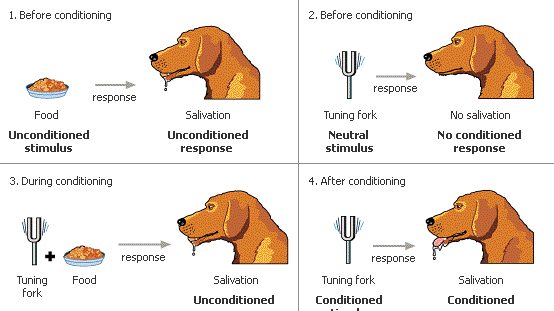
Behaviorism: learning theory which is fundamentally on human behavior and the factors underlining how such behavior change through practice and habit formation the theory holds that behavior of an organism can be explained in terms of conditioning, without demand to thoughts or feelings  
Cognitivism: the second theory learned that day, was cognitivist theory with emphasis on human cognition or intelligence as an exceptional gift enabling man to form theories and develop intellectual ability and competencies. Instructional techniques include the following: Acronym, mnemonic, chunking (break apart) information, Inquiry learning, Problem based learning etc
                                           

Constructivism: This is the school of thought which disputes that human being breed knowledge and meaning from an interaction between their experiences and their ideas. Application of constructivism into teaching and learning: discovery-based teaching technique, Inquiry based learning, Problem based learning, Project based learning, task-based learning, problem solving etc.

Image result for constructivism

Class Activities

Part of the segments of the class on that day was in the class task. Three group were formed to make a brief  presentation on the three theories focusing  on:
How do learners learn?  How does instruction differ?
What are the problems and strengths of that theory? How do I design appropriate instruction?

Tuesday, 8 December 2015

week 3 21st September, 2015 The seven Principles of innovative learning,

As usual the class started with a very brief recap of the previous topic. After much discussion on the 21st century  proliferation of technology tools and how this affect life generally, , there was an open discussion on the principle of innovative learning, where we referred to the  internet to make some instant researches  and thereafter uploaded our finding  in E-learning Forum.  The seven  Principles of innovative learning, encapsulates the following points: 

  1. - learner at the center
  2. - Social nature of learning
  3. - Emotion are integral with learner
  4. - Recognize student differences
  5. - Stretching all student
  6. - Assessment for learning
  7. - Building horizontal connection
Details of what we have learned from  the above are presented below:

  1. Learner at the center: This principle stresses that the learners should have a lot of freedom and role under the guidance of the teacher to construct their own knowledge through activity based learner-centered teaching approach. Group work, peer work feedback and self assessment are some of the strategies that guide the learner.
  2. Social nature of learning: This recognize the need for learning through cooperation and  collaboration with other students in order to allow cross fertilization of ideas    
  3. Assessment for Learning both formative and summative assessment should be carried out to check the progress of the students and compare it with thE instructional objectives
  4. Emotion are integral with learning: sensitivity to the emotional differences and need for motivation is central to this principle. The there is strong connection among emotion, motivation and cognition, which the teacher must be constantly aware of.
  5. Recognize student differences: Every individual student has a varying character and characteristics and teacher must take note these differences to ensure that all students are carried along regardless of their differences.
  6.  Stretching All Student: Students should be given task and activities that will stimulate both higher order and lower order thinking skills with out over stretching their strenths and capabilities as this may reduce their motivation to learn
  7. Building Horizontal Connection: learning experience should provide opportunity for wider application of knowledge in solving varieties of authentic problems of our daily life.

WEEK 2 14th September, 2015


 Reflection on  concepts:  INNOVATION, ILE,  PLE and SLE 
The class started with a recap on previous weeks 
lecture in order to refresh memories on the basic
concepts of Innovative Learning Environment  Learning Environment summarised as as an eco-system which includes the activity and the outcomes of the learning. Examples of the technologies used in ILE were given like: Multimedia Apps, Mobile Learning, MOOC / Massive Open Online  Course, Social Learning / Informal Learning, Gamification / Game-based Learning, Ubiquitous Learning and Augmented Realitywhich include  Innovation summarised as introducing or using new ideas or methods and converting creative ideas into desired outputs. after that the class members were given individual task to perform in e-learning on the concept of PLE and SLE.  The differences between two related concepts were explored and discussed. Personal Learning Environment (PLE) and Social Learning Environment (SLE).  were also highlighted. thus, PLE facilitates  learners' effort  to learn at their own pace and manage their own learning; in SLE learning  is said to occur through acive collaborative and interactive activities group and  peers.
The class concluded with the first individual assignment with the instruction as follows:
Discuss the currents trend and issues on Online Learning Environment (OLE): 
Center your discussion on:
Why is it a current issue? 
What are its challenges? 
What are the way forward?
Prepare and present via slides ppt
.